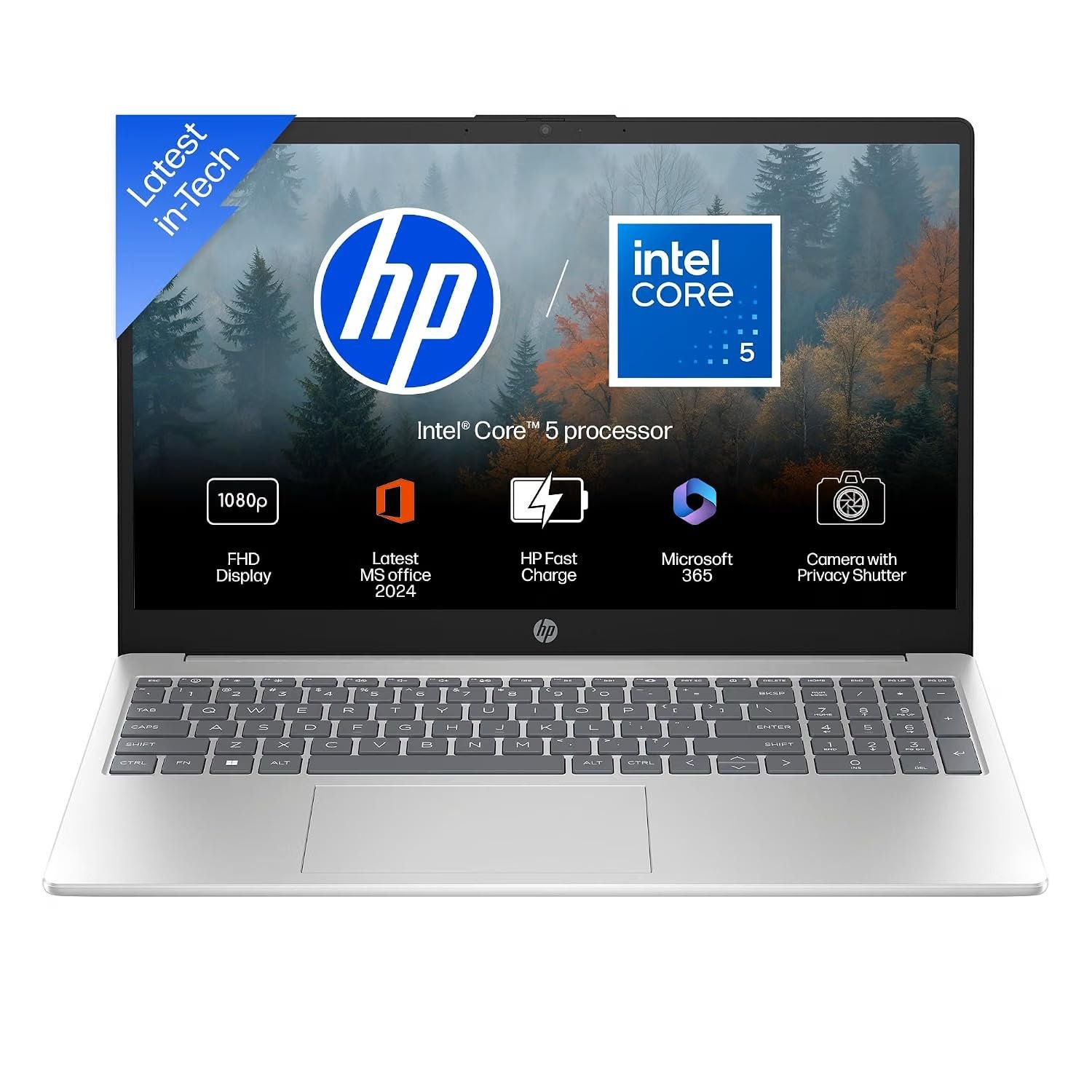
If you are looking for a practical Windows laptop for work, study, office tasks, browsing, entertainment, and everyday multitasking, the HP 15 with Intel Core 5-120U, 16GB RAM, and 512GB SSD is worth considering.
This HP laptop combines a 15.6-inch Full HD display with a modern Intel processor, generous memory, fast SSD storage, Windows 11, a backlit keyboard, and a Full HD camera with a privacy shutter. It is designed for users who want a balanced laptop rather than a machine focused exclusively on gaming or heavy professional workloads.
In this review, we will look at its specifications, everyday usability, display, performance, storage, keyboard, camera, portability, and overall value.
HP 15 Laptop Specifications
Here is a quick look at the main specifications of this HP 15 model:
| Feature | Specification |
|---|---|
| Brand | HP |
| Series | HP 15 |
| Processor | Intel Core 5-120U |
| Processor Generation | 14th Gen |
| RAM | 16GB |
| Storage | 512GB SSD |
| Display | 15.6-inch / 39.6 cm |
| Resolution | Full HD |
| Display Finish | Anti-Glare |
| Operating System | Windows 11 |
| Office | Microsoft Office 2024 |
| Microsoft 365 | M365 Basic, 1 year |
| Camera | Full HD camera with shutter |
| Keyboard | Backlit |
| Colour | Silver |
| Weight | Approximately 1.59 kg |
| Model | HP 15 fd0664TU |
Intel Core 5-120U Performance
The processor is one of the most important components in a laptop, and this HP 15 uses the Intel Core 5-120U.
For everyday computing, this processor is aimed at users who need responsive performance without necessarily buying a high-end performance laptop.
It should be well suited to common activities such as web browsing, Microsoft Office, online meetings, document creation, spreadsheets, email, video playback, and general multitasking.
The combination of the processor and 16GB RAM is particularly useful for people who regularly keep several browser tabs and applications open at the same time.
For example, you might have a browser open while working in Word, checking email, using Excel, and attending an online meeting. Having 16GB of RAM gives the laptop plenty of breathing room for this type of everyday workload.
However, this laptop should not be confused with a dedicated gaming or workstation laptop. Users who regularly perform demanding 3D rendering, advanced video production, or graphics-intensive gaming may want a laptop with a more powerful processor and dedicated graphics card.
16GB RAM Is a Major Advantage
One of the strongest aspects of this configuration is the 16GB RAM.
Many affordable laptops are still sold with lower memory configurations, which can become limiting when users run multiple applications simultaneously.
With 16GB, the HP 15 is better positioned for multitasking.
You can use applications such as:
- Microsoft Word
- Microsoft Excel
- PowerPoint
- Web browsers
- Video conferencing applications
- Online learning platforms
- Basic photo-editing software
- Accounting and business software
For students and office users, 16GB is a comfortable amount of memory for everyday Windows 11 use.
512GB SSD Storage
The laptop comes with a 512GB SSD, giving users considerably more storage than smaller entry-level configurations.
An SSD also provides the fast storage experience expected from a modern laptop, including quicker system startup and application loading compared with traditional mechanical hard drives.
The 512GB capacity can accommodate Windows, applications, documents, photographs, presentations, and other personal files.
For a typical student, professional, or home user, this should be a practical starting point.
However, users who store large collections of 4K videos, professional media files, or large games may eventually need external storage.
15.6-Inch Full HD Anti-Glare Display
The HP 15 features a 15.6-inch Full HD display with an anti-glare finish.
The 15.6-inch size is useful for productivity because there is more screen space for documents, spreadsheets, websites, and multiple windows than on smaller laptops.
The Full HD resolution also provides a sharper workspace than lower-resolution displays.
The anti-glare finish can be helpful in everyday environments because it is designed to reduce distracting reflections from surrounding light.
This makes the display suitable for common tasks such as:
- Office work
- Studying
- Browsing
- Watching videos
- Reading documents
- Working with spreadsheets
- Online meetings
If your main priority is professional color-critical work such as advanced photo editing, graphic design, or professional video production, however, you should check the panel’s detailed color specifications before purchasing.
Full HD Camera With Privacy Shutter
For people who frequently attend online meetings, the built-in Full HD camera is a useful feature.
The camera can be used for video calls, online classes, interviews, and virtual meetings.
Another useful addition is the privacy shutter.
A physical camera shutter gives users a simple way to cover the camera when it is not being used. This can be reassuring for people who are particularly conscious of webcam privacy.
Backlit Keyboard
The HP 15 also includes a backlit keyboard.
This can be particularly convenient when working in dim lighting.
For students who study at night or professionals who occasionally work in low-light environments, keyboard backlighting can make individual keys easier to locate.
The larger 15.6-inch laptop format also provides a comfortable working area compared with compact laptops.
Windows 11
The laptop comes with Windows 11, Microsoft’s modern desktop operating system.
Windows 11 provides access to a wide range of applications and services and is familiar to most Windows users.
For office users, students, and home users, having Windows 11 preinstalled means the laptop is ready for normal setup after purchase.
Microsoft Office 2024 and Microsoft 365 Basic
Another attractive part of this configuration is the included Microsoft software.
The listing specifies Office 2024 along with Microsoft 365 Basic for one year.
This can be useful for students and office users who need applications and services associated with Microsoft’s productivity ecosystem.
Before purchasing, buyers should carefully check the exact terms of the included licenses and activation requirements because bundled software benefits can vary by product and promotion.
Silver Design and 1.59 kg Weight
Despite having a 15.6-inch display, the laptop is listed at approximately 1.59 kg.
That makes it reasonably practical for users who need to carry their laptop between home, office, college, or other locations.
The silver finish gives the laptop a conventional professional appearance that can work well in both office and educational environments.
If you regularly travel with your laptop, it is still worth considering the charger and other accessories because they add to the total carrying weight.
Who Should Buy the HP 15 Core 5-120U?
This HP 15 configuration makes the most sense for people looking for an everyday productivity laptop.
Students
Students can use it for online classes, research, assignments, presentations, browsing, and document work.
The 16GB RAM and 512GB SSD are particularly useful for students who want a laptop they can continue using for several years.
Office Professionals
For office work involving Word, Excel, PowerPoint, email, browser-based applications, and video meetings, this configuration offers a sensible combination of processor performance, RAM, and storage.
Home Users
For browsing the internet, watching videos, managing documents, online shopping, banking, and other everyday activities, the HP 15 provides a familiar Windows laptop experience.
Small Business Owners
Small businesses often need one machine capable of handling billing software, spreadsheets, email, online portals, printing-related tasks, and general administration.
The 16GB RAM configuration gives users flexibility when several programs are being used together.
Who May Want a Different Laptop?
The HP 15 isn’t designed to be a dedicated high-performance gaming laptop.
You may want to consider another category of laptop if your primary work involves:
- High-end gaming
- Professional 3D rendering
- Heavy 4K video editing
- Advanced CAD workloads
- Professional GPU computing
- Other sustained graphics-intensive workloads
For those tasks, a laptop with a dedicated graphics processor may be more appropriate.
HP 15 vs Typical Entry-Level Laptops
The biggest advantage of this configuration compared with many basic laptops is its combination of 16GB RAM and 512GB SSD storage.
Instead of focusing only on the lowest possible purchase price, buyers should consider how the laptop will perform after several years of use.
A laptop with sufficient RAM and SSD storage can provide a more comfortable everyday experience than a configuration that saves money initially but requires upgrades sooner.
The Core 5-120U processor also places this model above many basic laptops intended primarily for simple browsing and document work.
Is the HP 15 Good for Work From Home?
For typical work-from-home requirements, this configuration can be a practical choice.
The large Full HD display provides a useful workspace for documents and browser applications, while the Full HD camera is suitable for video meetings.
The backlit keyboard can also be useful when working during the evening.
For demanding professional workloads, however, buyers should evaluate the exact applications they use before purchasing.
Is It Good for Students?
Yes, this configuration is well suited to many students.
A student can use it for:
- Online classes
- Research
- Microsoft Office
- Presentations
- Assignments
- Programming
- Web browsing
- Video streaming
- Video calls
- General productivity
The 512GB SSD provides useful storage for study materials, while 16GB RAM gives the system room for multitasking.
Is It Good for Business Use?
For general business and office applications, the HP 15 is a sensible option.
It can be useful for employees and small-business users who work with documents, spreadsheets, email, web applications, accounting software, and video meetings.
The 15.6-inch display is also more comfortable for spreadsheet-heavy work than a very small laptop screen.
Pros and Cons
Pros
- Intel Core 5-120U processor
- 16GB RAM
- 512GB SSD
- 15.6-inch Full HD display
- Anti-glare screen
- Windows 11
- Full HD webcam
- Physical camera privacy shutter
- Backlit keyboard
- Microsoft Office 2024 included
- Microsoft 365 Basic for one year
- Approximately 1.59 kg weight
- Suitable for everyday productivity
Cons
- Not aimed at dedicated gaming
- No dedicated graphics processor specified
- Professional creators should check detailed display specifications
- 512GB may be insufficient for users with very large media libraries
Final Verdict: Should You Buy the HP 15?
The HP 15 Core 5-120U laptop is a balanced option for users who want a modern Windows laptop for everyday productivity.
Its strongest combination is the Intel Core 5-120U processor, 16GB RAM, and 512GB SSD. Add the 15.6-inch Full HD anti-glare display, backlit keyboard, Full HD camera with privacy shutter, Windows 11, and bundled Microsoft software, and the package becomes particularly appealing for students, office professionals, home users, and small-business owners.
It is not intended to replace a dedicated gaming or professional workstation laptop, but that is not its purpose.
For everyday computing, productivity, education, business work, browsing, meetings, and entertainment, this HP 15 configuration offers a well-rounded feature set.
Before buying, compare the current Amazon price with competing HP, Lenovo, Dell, and ASUS models and check the exact warranty and bundled software terms.
Where to Buy
You can check the latest price, availability, offers, and seller information on Amazon before making your purchase.
Check the HP 15 Core 5-120U on Amazon:
Buy Now
Frequently Asked Questions
Is the HP 15 good for office work?
Yes. The Core 5-120U processor, 16GB RAM, 512GB SSD, and 15.6-inch Full HD display make this configuration suitable for typical office productivity.
Does the HP 15 have 16GB RAM?
Yes. This configuration is listed with 16GB RAM.
Does it have an SSD?
Yes. It comes with a 512GB SSD.
What size is the display?
The laptop has a 15.6-inch, or 39.6 cm, Full HD display.
Does it have a backlit keyboard?
Yes. The listed configuration includes a backlit keyboard.
Does the laptop have a webcam privacy shutter?
Yes. The product specification lists a Full HD camera with a shutter.
Is this HP laptop suitable for gaming?
It can handle suitable everyday and less-demanding games depending on the graphics configuration and game requirements, but it is better viewed as a productivity laptop rather than a dedicated gaming machine.
Is the HP 15 suitable for students?
Yes. Its 16GB RAM, 512GB SSD, Full HD display, and Windows 11 make it suitable for many common student workloads.
How much does the HP 15 weigh?
The listed weight is approximately 1.59 kg.
Does it include Microsoft Office?
The product listing specifies Office 2024 and Microsoft 365 Basic for one year. Buyers should verify the exact activation and license terms on the product page before purchase.
Final Buying Tip
Don’t choose a laptop based on the processor name alone. Look at the complete configuration.
In this case, the combination of Core 5-120U + 16GB RAM + 512GB SSD + Full HD display is what makes this particular HP 15 configuration interesting for everyday users.
If the Amazon price is competitive with similarly configured laptops, it can be a strong option for someone looking for a dependable everyday Windows laptop without moving into the higher-priced premium or gaming categories.